
3.9 Manage capabilities and connections
The Capabilities page manages skills, connections, task templates, and extensions that can be reused across business areas. Market helps you discover resources; Capabilities shows what you have added and how it is configured.
Add and configure resources
- Open the section for the resource type you want to add.
- Create it locally, import it, or choose an available resource from Market.
- Check the item's status and open its configuration page to complete the required information.
- Link it to the colleague or business area that will use it, then test it once.
“Added” only means the resource is now managed by Teloa. It does not prove that a connection works or a tool is authorized.
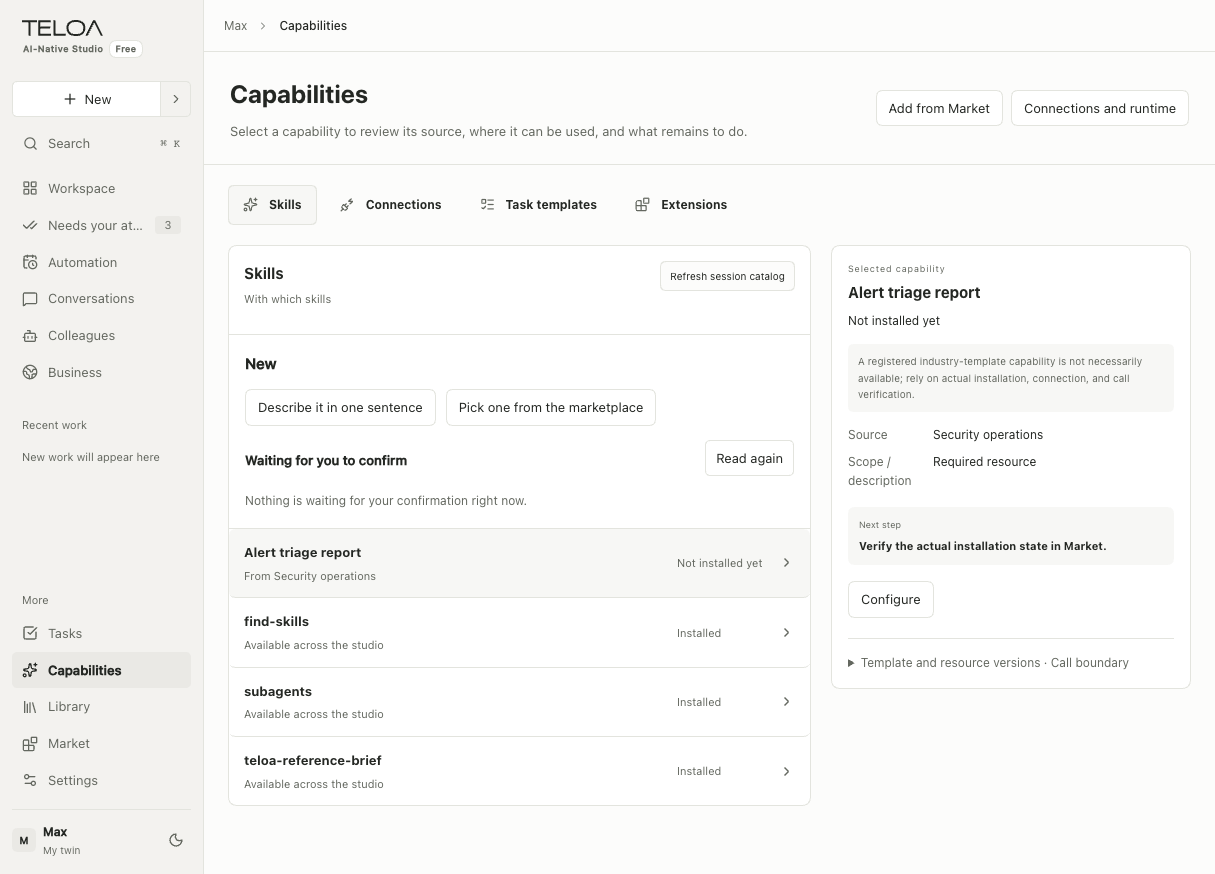
English interface with sample data. Switch between skills, connections, task templates, and extensions at the top. Select an item to see its status, next step, and configuration entry on the right.
Connect external tools
DSH manages configuration for MCP and native runtime capabilities. Data sources, business associations, and role permissions have their own configuration pages. Test read access first, then enable only the write capabilities you need.
Connections may show “Read,” “Write,” or “Write · Needs your approval.” These labels provide guidance. They do not replace checking the specific tool, its parameters, and its execution boundaries.
Current extension availability
The extension mechanism remains available, but the official extension allowlist is currently empty. No matching extension does not necessarily mean a network failure. Entering an arbitrary npm package name cannot bypass the catalog restrictions.
Developers can start with skills, resource packages, and read-only MCP. Plugins and new Harness interfaces that have not been opened for use are not promised to be installable.